
The client called, but advertising “doesn’t see” it: how call tracking returns telephone leads to analytics
A customer clicked on an ad, viewed a service page, and called to clarify the details. The manager took the order, but the inquiry was not recorded in the advertising campaign report. A purchase was made, but it is unclear which ad brought in the customer. Because of this gap, the business risks cutting the budget of a campaign that is actually generating sales.
Call tracking helps identify where a caller came from: a paid ad, organic search, or another source. To do this, separate phone numbers are assigned to advertising channels or website visits.
Why clicks and form submissions aren’t enough
Before booking an appointment at a clinic, arranging repairs, or purchasing equipment, people often want to speak with a manager. When reports include only form submissions, comparisons between advertising campaigns can be misleading.
Let’s consider two campaigns with the same advertising budget — UAH 12,000 each per month. To simplify the calculation, each inquiry in this example comes from a different potential customer interested in making a purchase.
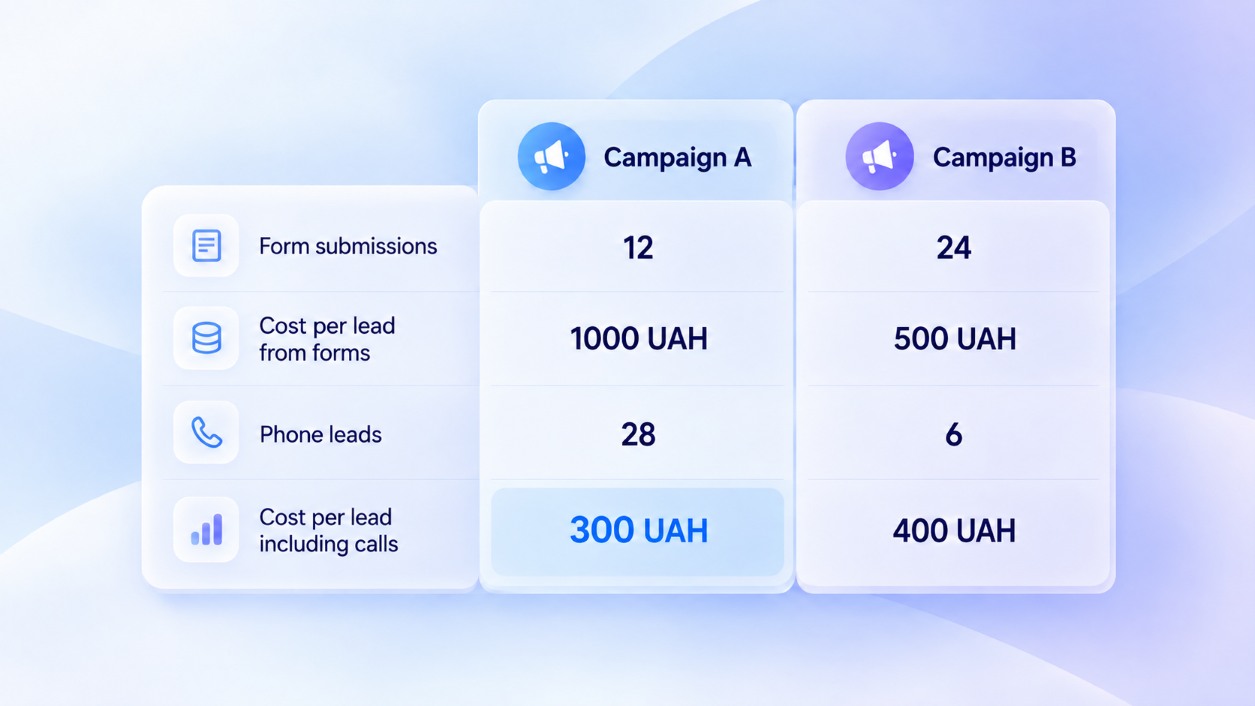
If only form submissions are counted, a lead from Campaign A costs twice as much. When phone calls are included, the conclusion changes: UAH 300 per lead versus UAH 400. Before increasing the budget, the next step is to check how many of these inquiries resulted in a purchase.
How call tracking links a call to an advertisement
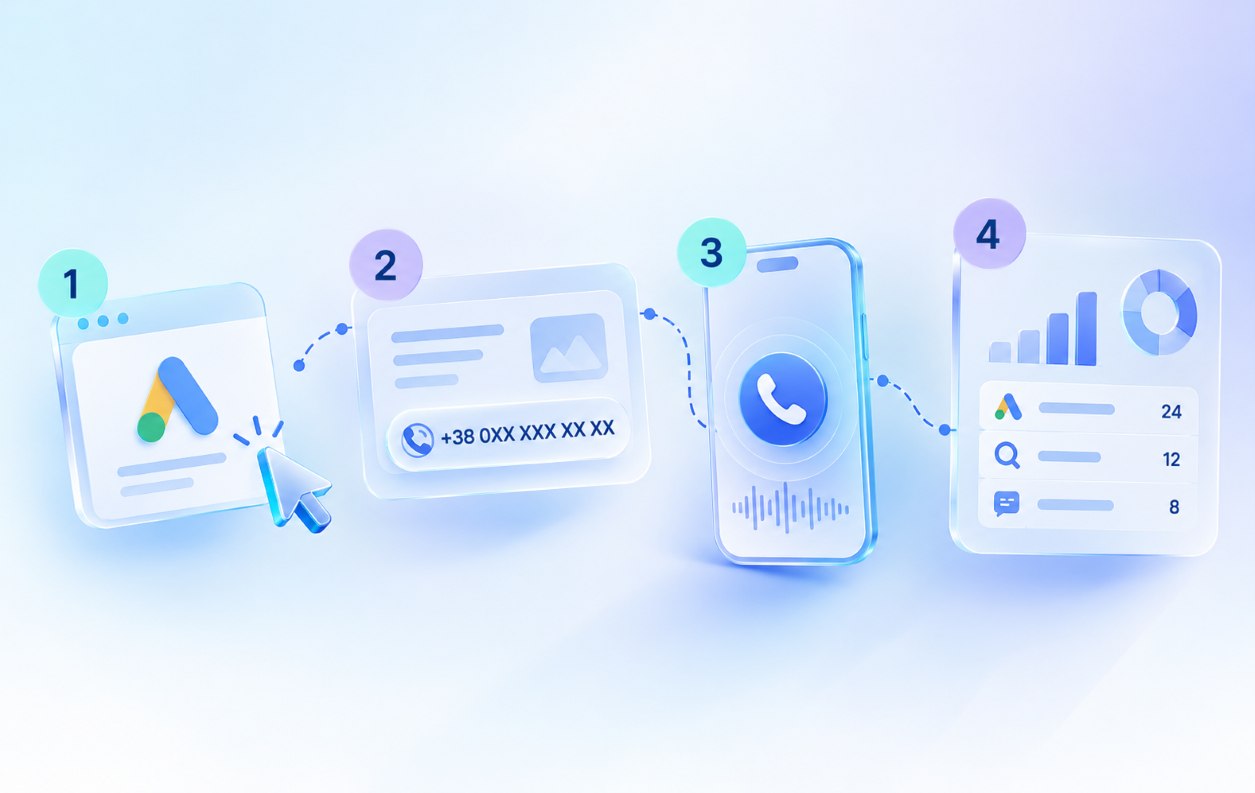
Call tracking for websites can link a phone call to a specific website visit. This is done using dynamic number insertion:
- A visitor arrives at your website. The system collects available data about the traffic source.
- A replacement phone number appears on the page. The system temporarily associates this number with that website visit.
- The customer makes a call. Your team answers the call, while the system records where the visitor came from.
- The data appears in a report. With the appropriate integrations configured, it can be transferred to your CRM.
If you need to compare specific channels, you can use static call tracking—for example, by placing one permanent number on an advertising banner and another in a print advertisement. The dynamic format allows for the analysis of individual website visits.
Tapping the number doesn’t mean making a call yet
As explained in the Google Ads Help Center, tracking clicks on a phone number on a website records clicks, not actual calls. A person may tap “Call,” open the phone dialer, and then change their mind. Alternatively, they may manually dial the number from another device without clicking anything on the website. Therefore, the number of clicks does not show how many calls the company actually received.
A call, a lead, and a sale are different outcomes
The fact that someone called does not necessarily mean that an ad brought in a new customer. People may call to ask about an existing order, follow up after a consultation, or make an irrelevant offer.
To assess the quality of phone inquiries, check:
- the purpose of the call — whether the caller was interested in purchasing your product or service;
- repeat contacts — whether this is a new potential customer or a continuation of a previous conversation;
- the outcome of the inquiry — whether a purchase was made, the customer is still making a decision, or has already declined.
Call tracking records the source of the call, while the manager logs the outcome of the inquiry in the CRM. With the appropriate integration configured, these data can be combined to identify which campaigns bring in paying customers. Multiple conversations with the same person should not be counted as multiple new leads.
What to check before changing the advertising budget
Before turning off a campaign or increasing spending, check what is happening with your inquiries:
- Few form submissions but many qualified calls? Calculate the overall cost per lead, taking both types of inquiries into account.
- Calls are coming in, but your team is missing them? Check your managers’ schedules and workloads, not just your advertising settings.
- Inquiries are inexpensive, but few result in purchases? Analyze lead quality and the reasons for lost sales in your CRM.
Compare metrics over the same periods and account for the time it takes to make a purchase. For expensive equipment or real estate, several weeks may pass between the first conversation and payment. Evaluating such a campaign based only on sales made on the day of the inquiry means overlooking some of its results.
How to start tracking phone inquiries
To get started, decide which advertising sources you want to compare and where you will analyze the results. If you need to track the customer journey through to a sale, plan for CRM integration from the outset.
At Stream Telecom, we will configure call tracking for your website and advertising channels: select the appropriate tracking method and number of phone numbers, set up dynamic number insertion, and connect the agreed-upon analytics and CRM integrations. Before launch, we will make test calls and verify that inquiry sources are identified correctly.
Submit a request — we’ll answer all your questions and calculate the cost of setting up call tracking for your website.
Recommended articles
How to Add Call Tracking Code in Google Tag Manager
Related glossary termsCall Tracking
Read article
Call Tracking for Small Business: Which Ads Really Bring You Calls Slug: call-tracking-small-business
Related glossary termsCall Tracking
Read article
How Call Tracking Works: The Principle of Call Tracking and Ad Analysis
Related glossary termsCall Tracking
Read article