Stream Phone · iOS and Android

Stream Phone.
Calls and customers.

Stream Phone is a mobile app for working with telephony and StreamCRM. Respond to customers outside the office, review call history, and follow up on missed inquiries.

  • Call history and the inquiry queue at your fingertips.
  • Customer contacts from the corporate system.
  • Access business data over the internet.
Stream Phone: calls, history, and customers in the mobile app

Work continues outside the office

An important inquiry should not wait,
until you return to your computer

Missed a call?

Open the history and check missed inquiries. Follow up with the customer from your smartphone.

Need a customer contact?

Find the information in the corporate database instead of searching through messages and personal notes for phone numbers.

Need to check the queue?

Review inquiries in the queue and decide who should be contacted first.

The app in action

Four sections for everyday tasks

Dialing, call history, the inquiry queue, and customers — all in one mobile app.
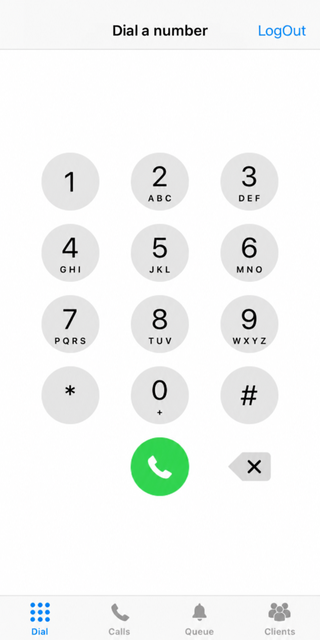
01 · Calls

Calls

Dial the number you need and contact the customer through your connected telephony.

Stream Phone: dialer screen

02 · History

All calls

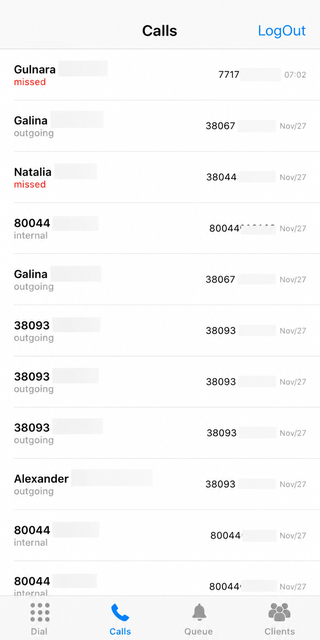
View incoming, outgoing, and missed calls.

Stream Phone: incoming, outgoing, and missed call log

03 · Priorities

Queue

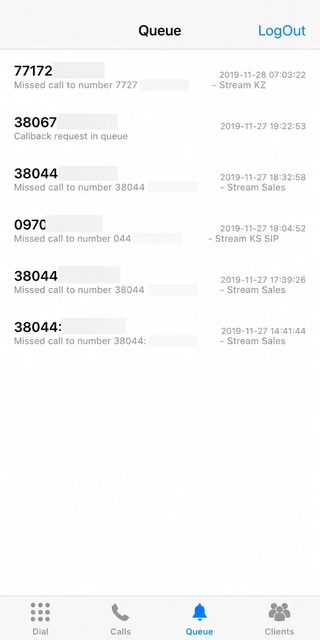
Check inquiries in the queue and follow up from your smartphone.

Stream Phone: inquiry queue section

04 · Contacts

Customers

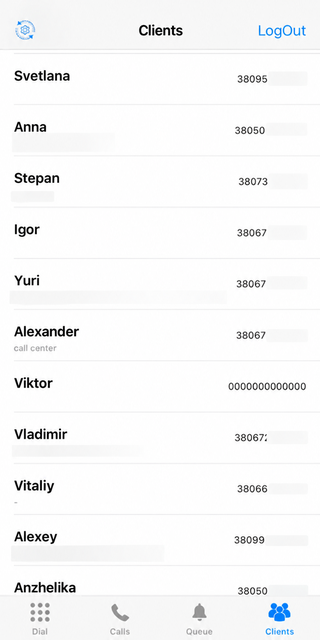
Find contacts and information in the corporate customer database.

Stream Phone: customer list

What changes for the team

Less switching.
More attention to the customer.

History at your fingertips

See who called and which inquiries need your attention, even when you are away from your work computer.

Data from StreamCRM

Work with information from the corporate system. The app connects to the server over the internet to exchange data.

Search and filters

Find the information you need in the available sections instead of manually browsing long lists.

Quick dialing

Go directly from a customer contact to a call without copying the number to paper or another app.

Call details

View call details. If a recording is available in the system and you have the required permissions, you can return to the conversation.

iOS and Android

Use the app on a compatible device. Current requirements are listed in the relevant app store.

For different working days

Who can benefit from Stream Phone

Sales managers

Contacts and call history are available between meetings. You can check the information and contact the customer.

Managers

Check calls and the queue from your smartphone when you cannot access your workstation.

Distributed teams

Work with company data outside the office using your access to StreamCRM and connected telephony.

Before installation

What you need to use the app

Stream Telecom account

The app connects to your work account. Configured telephony is required for calls, while access to corporate data requires the appropriate StreamCRM permissions.

Internet connection and a compatible phone

Use Wi-Fi or mobile internet. Connection quality affects the app and call performance. For incoming calls, make sure the required permissions and notifications are enabled.

Stream Phone is an app, not a separate mobile service plan.

If you need voice calls through a dedicated SIM/eSIM without internet access on the phone, see the FMC “Mobile Employees”.

Stream Phone Pricing

Try it in real work.
Then pay a simple per-user fee.

For StreamCRM users

First month

0 UAH/month

Use the app free of charge for the first month.

  • Test access to calls and contacts.
  • Evaluate how convenient it is to work outside the office.
  • We will help you with the setup.

After the free period

Stream Phone

50 UAH/month

per user

For example, for five users: 5 × 50 = UAH 250 per month for the app.

This fee covers Stream Phone. PBX, CRM, phone numbers, calls, and internet services are charged according to your connected plans and agreement.

Getting started is easy

From installation to your first business call

01

Download the app

Open the StreamPhone page in the App Store or Google Play on a compatible device.

02

Sign in to your account

Use your access credentials for the Stream Telecom system. If you do not have an account yet, contact us to get connected.

03

Test the app

Wait for the available data to load, then check contacts, notifications, and make a test call.

Official app stores

Install Stream Phone

Choose your device platform. Use your Stream Telecom account to access the app.

For iPhone and iPad

App Store

For Android devices

Google Play

Assisted Setup

Keep your team connected.
Wherever the workday takes you.

We will help connect Stream Phone to your system and verify that the app works correctly on your employees’ devices.

ANSWERS BEFORE CONNECTION

Frequently Asked Questions about Stream Phone

Stream Phone is a mobile app for working with telephony and StreamCRM. It lets you use available calling features and view call history, the inquiry queue, and customer contacts from your smartphone.

Yes. The page contains links to the official StreamPhone listings in the App Store and Google Play. Check the relevant store for device compatibility and operating system requirements.

A Stream Telecom account and configured telephony are required for business calls. Customer data is available according to your system access permissions. If you are not connected yet, we will help you choose the right setup.

Yes. The app uses the internet to connect to the system and work with data. Calls through the app require a connection with sufficient quality. FMC with a dedicated SIM/eSIM is a separate solution.

The app includes dialing, call history, the inquiry queue, and customer information. The exact data and available actions depend on the connected services and user permissions.

A recording may be available in the call details if it exists in the system and the user has the appropriate permissions. The app should not be considered a universal recorder for all personal calls on the phone.

Yes, provided you have a suitable internet connection and access to your account. Calls, internet, and mobile roaming are charged according to the relevant plans; the app itself does not make these services free.

For StreamCRM users, the first month of Stream Phone is free. After that, the published price is UAH 50 per user per month. Related telephony, CRM, and connectivity services are billed separately under your agreement.

Stream Phone is an app that connects to the corporate system over the internet. FMC connects an employee’s mobile phone to corporate telephony using a dedicated SIM/eSIM and the mobile operator’s voice network.

Check that you are signed in, verify the internet connection, incoming-call settings, and notification permissions. If the problem persists, contact support to check the configuration.