
A question starts a conversation
Don’t leave customers
to make the choice alone
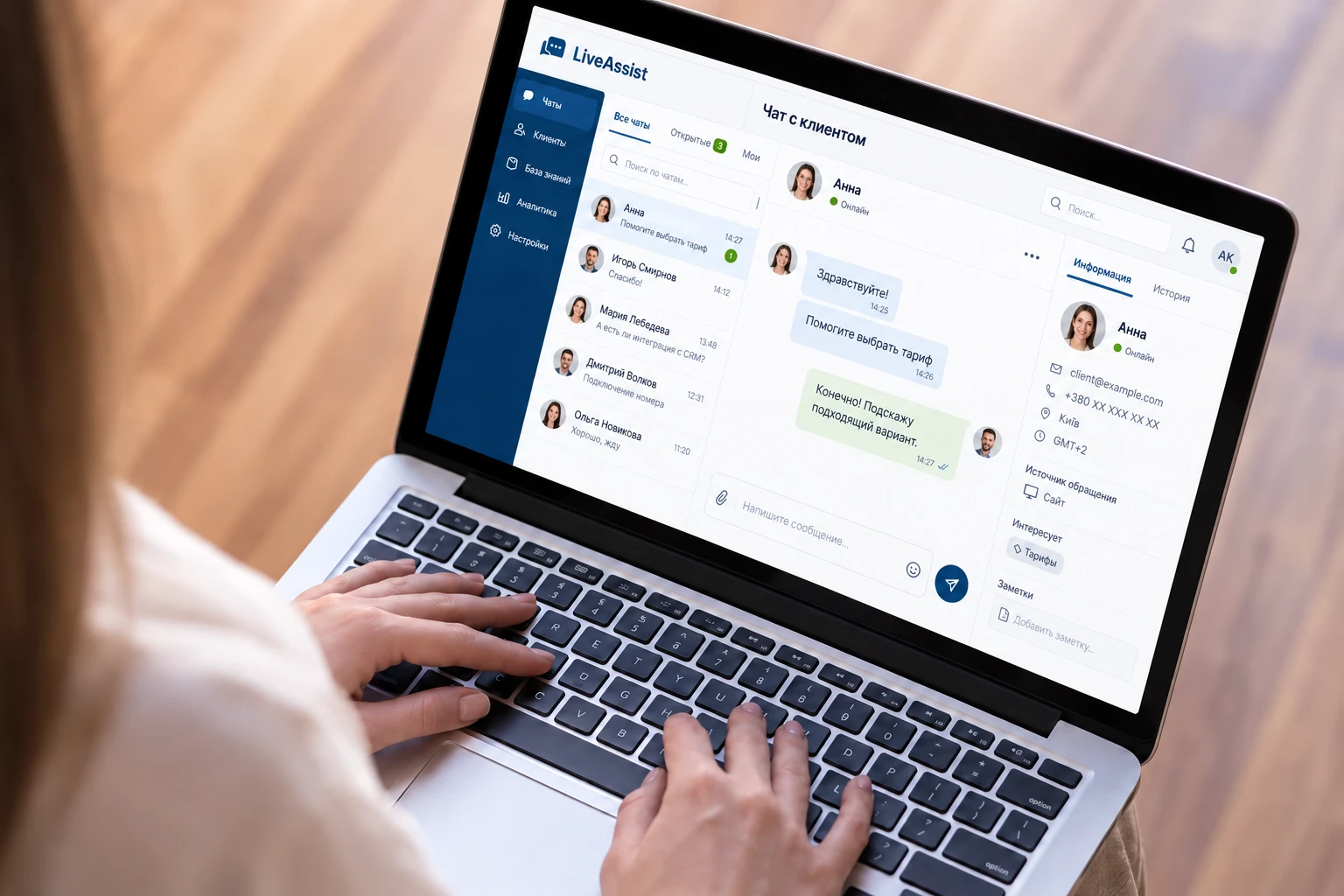
Price, availability, delivery or connection terms — sometimes one answer is all it takes for someone to continue placing an order.
LiveAssist adds a convenient chat window to your website. Visitors send messages, while your team sees the conversation, inquiry history and customer information.
Help visitors choose
Explain the differences between offers and address concerns before visitors leave.
Capture contact details
Request a name, phone number or email address through a system message directly in the conversation.
Keep the conversation going
Use the conversation history so customers do not have to repeat their questions.
Features for everyday work
Fewer unnecessary steps. More attention to customers.
Canned responses
Use prepared phrases for common questions and up to three quick-reply buttons in the widget.

Online visitors
See which website and page a visitor is viewing and how long they have been online.
Conversation transfer
Bring in a colleague to help resolve an issue and transfer the conversation to the right specialist.

Files in chat
Send images and documents up to 5 MB — one file per message.

A design that fits your website
Customise the appearance, add your logo and choose from 15 fonts.

Business hours and after-hours settings
Set your schedule, time zone and different greetings so visitors know what to expect.
Everything in view
What the LiveAssist workspace looks like
Conversations, visitor details and operator tools — all on one screen. The numbers in the screenshot match the explanations below.

1
Balance and storage
Administrators see the balance, while employees see storage usage. Key information is always close at hand.
2
Conversation list
Your conversation history stays in the chat. Visitors returning in the same browser will see your replies.
3
Visitor information
Contact details, status and browsing history help operators respond with the right context.
4
Status and workload
Administrators control whether they receive incoming conversations. Employees change their availability status.
5
Teamwork
Transfer conversations, add tags and request contact details. Administrators and supervisors can join the conversation.
6
Message editing
Operators can edit a sent message within 10 minutes.
7
A convenient editor
Format text, add lists, files and images. Use commands and canned responses.
8
Three interface languages
Russian, Ukrainian and English.
A familiar screen for each task
A workspace you will enjoy using
Choose a section to explore the interface. All examples can be opened at full size.
Find the right contacts without a lengthy search
Sort visitors by website, status, name, email or phone number. View blocked users separately.

Understand what interests your visitors
See the page, time spent on the website and current conversation. Use this context to offer relevant help.

Manage your team
Check operator roles and statuses, edit access permissions and find employees assigned to a specific website.

Keep track of expenses
View your overall and detailed payment history. Filter by period to review your spending.

Return to the context of an inquiry
Find previous conversations using visitor details. New employees can quickly understand what has already been discussed.

Multiple websites — clear access permissions
Manage widgets for your domains. Operators and supervisors see visitors from the websites they are assigned to. Each chat is installed on one website.

Talk to the Stream Telecom team
Contact support from your workspace: ask a question, report an error or suggest an improvement.

Add employees securely
Invite colleagues by email or code. Phone call verification helps protect the account; the schedule is configured in the settings.

Chat in your style
Visitors see your brand.
Your team gets a convenient tool.
Match the widget to your website: colours, logo, font and greeting. Adding your own logo is free.
- Preset buttons help start a conversation.
- Contact requests appear as system messages.
- Delayed display lets you choose when the chat appears.

Business use cases
Where a live response matters most
Online stores
Help customers compare products, check availability and clarify delivery terms.
Services and B2B
Understand the customer’s needs, answer questions about terms and collect contact details for a consultation.
Healthcare and education
Clarify schedules, booking procedures, appointment fees or study requirements.
Set up your chat in just 7 simple steps
First you need to complete domain verification and choose
the language for the chat. Domain verification is necessary for
your security. Now you don't have to worry about leaking
data or money to unknown places simply because one
and the same chat can be installed on many sites.
One chat = one site.
Here you can also set a delayed display of the chat, brand
identity. Adding your own logo is free of charge. You can also
choose from 15 popular fonts. Here you can also set a delayed
display of the chat, so as not to overload the loading of the site.
In this step, you select your time zone and
chat schedule.
This is where you customize the greetings that will
show up during business and non-business hours.
Are you getting a lot of one-size-fits-all requests? Set up to
three ready-to-answer buttons and take some of the burden off
your operators. By clicking on one of them the customer will
receive important information or can leave contact data for
consultation.
Next is setting up the “data request” function.
It allows you to unobtrusively request contact information about
the user. To do this, the operator just needs to press one button
and the client will see a system message with a request to leave
data about himself.
The chat setup was successful. All that remains is to add
it to your site and provide your customers with a new level of
service.


LiveAssist by Stream Telecom
Support alongside
your team
Contact us directly from your workspace: we will help you understand the chat settings and features.
If your workflow requires custom enhancements, we will discuss your needs, the scope of work and implementation terms.
Enhance customer communication with Stream Telecom solutions: virtual PBX and StreamCRM.
Answers before you get started