StreamCRM Update: New Features for Teams and Marketing
Several departments, one manager, a single workspace
When one manager is responsible for several teams or directions at once, working with them needs to be simple and convenient. That’s why we’ve expanded the capabilities available to users with “Department Head” access level in StreamCRM.
Now a single manager can be assigned several additional departments and given access to all the necessary units through one account.
There’s no longer any need to create separate accounts or open access to the entire company. The manager works only with the teams they’re responsible for, while the company retains a clear separation of rights and areas of responsibility.
All the necessary departments in one space
Once additional departments are assigned, the Department Head’s rights automatically extend to each attached unit.
The manager gains the ability to:
- work with data from several departments in one account;
- oversee the work of subordinate teams;
- manage employees within the available rights;
- quickly switch between directions without re-authorization;
- stay focused solely on their own area of responsibility.
As a result, managing several teams becomes simpler, while the access structure remains transparent and secure: the user sees only the units assigned to them and has no access to other departments of the company.
This is a flexible solution for regional managers, heads of groups of departments, and companies with a complex organizational structure.
New StreamCRM feature: now advertising “knows” which lead is real
The main advantage, in one sentence
Lead verification (qualification) for Google Ads is the ability to mark the quality of every inquiry (call, request, callback) directly in the CRM and automatically pass that assessment to Google Analytics 4 and Google Ads as a separate conversion event. As a result, advertising algorithms learn not from the number of inquiries, but from their actual quality.
StreamCRM now passes to Google Analytics 4 not just the fact of a call or request, but a quality assessment of each inquiry — which means advertising algorithms (Google Ads, Smart Bidding) get, for the first time, an honest signal: who is a genuine customer and who is spam, a wrong number, or an existing customer calling about something else.
Previously, marketing only saw the number of inquiries from a channel. Now it sees their quality.
Why this matters for marketing
Imagine an ad campaign that brings in 50 calls a day. At first glance — a success. But if 20 of them are wrong numbers and 10 are existing customers calling support, then the campaign is actually bringing in only 20 real leads, while the budget keeps “feeding” ineffective placements.
Inquiry verification closes this blind spot:
- The budget is no longer spent blindly. Google Ads and Smart Bidding receive real conversion data and stop showing ads to audiences that don’t convert.
- Quality is visible, not just quantity, for every channel. You can compare not “how many calls channel X delivered,” but “how many of them were real leads.”
- The data is always accurate, because status is assigned to each individual inquiry, not to the customer as a whole. The same customer might call twice: the first time as a new lead, the second time just to check on payment for a service they already have. StreamCRM distinguishes between these correctly.
- A transparent, controlled process. Every inquiry goes through one of four statuses, confirmed by the manager who actually spoke with the customer.
What it looks like from the manager’s side
The feature is built directly into everyday work — in the “Calls,” “Queue,” and “GetClient Requests” sections — with no separate tools or learning curve.
- The manager finds the relevant inquiry and clicks the green flag icon in the “Management” column.
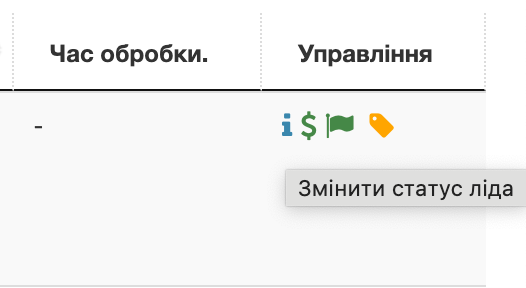
2. A compact “Change Lead Status” window opens with a drop-down list.
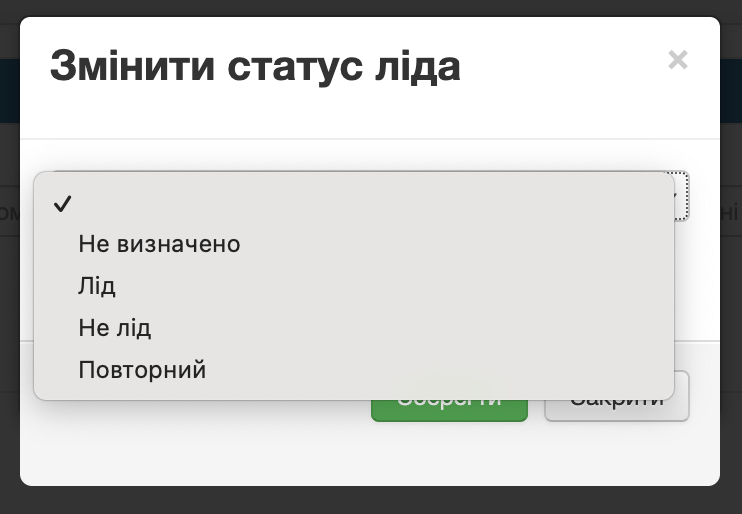
3. They select one of four statuses and click “Save” — the status is instantly passed to GA4.
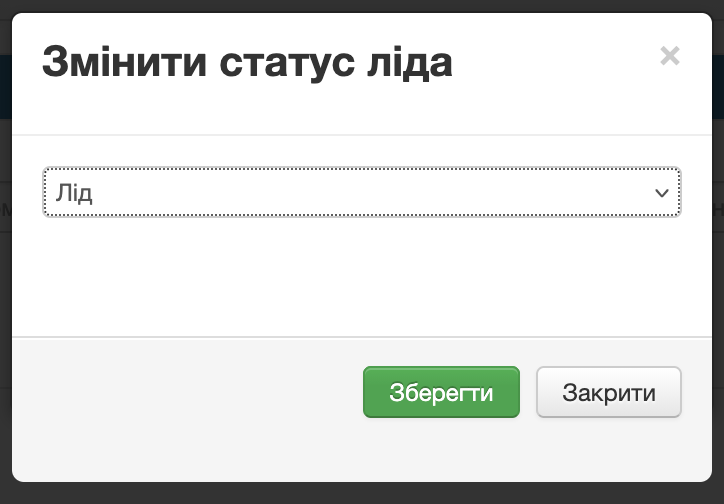
If the manager hasn’t managed to reach the customer after 1–2 attempts, they simply close the window without saving — the status stays “Undefined,” and nothing is passed to GA4. But if the customer still hasn’t been reached after 3 or more attempts, the manager consciously selects “Not a lead” — and only then does a disqualification event go to GA4, clearing the channel of non-target traffic. In other words, data is only recorded once contact has actually happened (or definitely hasn’t, after several attempts) and has received a deliberate, consciously saved assessment.
Status guide and what they mean for the ad account
| Status | When it’s set | What GA4 sees |
|---|---|---|
| Lead | A target inquiry, including from an existing customer purchasing a completely new service (cross-sell) | A successful conversion event → the algorithm looks for more similar customers |
| Repeat | An existing customer reaching out about an operational question regarding an already connected service | Activity is recorded, but doesn’t affect new-sales statistics |
| Not a lead | Spam, a wrong number, or a customer who was never reached after 3+ attempts | A disqualification event → the channel is cleared of non-target traffic |
| Undefined | The default status, including after 1–2 temporary unanswered attempts | No data is passed to GA4 |
For maximum accuracy
The feature delivers the most value when combined with two other StreamCRM tools:
- Call tracking — for correctly identifying the advertising source of each call;
- StreamCRM call-back widget — fills out the picture with inquiries that call tracking doesn’t always fully capture (due to ad blockers).
Recommendation for the cleanest possible data: call tracking as the primary call-tracking channel + verification of every inquiry + passing the results to GA4.
What to know about current limitations
At this stage, an inquiry’s status:
- does not change the customer’s card in the CRM;
- does not sync with deals;
- does not extend to other inquiries from the same customer.
In other words, this is a tool specifically for analytics and ad optimization — not for CRM customer record-keeping.
🚀 Try StreamCRM in action — free for 14 days
Connect telephony, a virtual PBX, and call tracking in one workspace, manage several departments from one account, and get accurate data on the quality of every lead for Google Ads.
→ Request a StreamCRM trial connection
Digest summary: StreamCRM continues to grow in two directions at once — more convenient team management for managers, and more accurate data for marketing. Now one manager can run several departments from a single account, while advertising learns from the real quality of leads rather than raw numbers. This is a direct path to budget savings, more precise campaign optimization, and simpler team oversight.
Recommended articles
Remote Team Call Management in Business Communications
Read article
Why the Gen Z rep on your sales team isn’t a problem — they’re a diamond in the rough?
Read article