How to connect a SIP number: a step-by-step guide for businesses
Need a business phone number that customers can call regardless of where your sales team works? You do not have to install an office PBX or lay telephone lines. Simply connect SIP telephony.
A SIP number allows you to make and receive calls over the internet from a computer, smartphone or IP phone. You can use it on its own or connect it to a virtual PBX to distribute calls among employees, record conversations and keep call statistics.
We will explain step by step how to obtain and connect a SIP number, what you need to set it up, how much it costs and how to organise telephone communications for your business.
What is a SIP number and how does it work?
A SIP number is a telephone number connected to an IP telephony system that allows you to make and receive calls over the internet. Unlike traditional telephony, it does not require a separate physical telephone line. Employees can use the business number through an IP phone or a dedicated application on a computer or smartphone.
This type of telephony uses SIP (Session Initiation Protocol). The protocol establishes and terminates connections, while voice is transmitted over an IP network during the conversation. Calls are managed by the provider’s telephone system, to which employees’ devices connect.
How does a call work with SIP telephony?
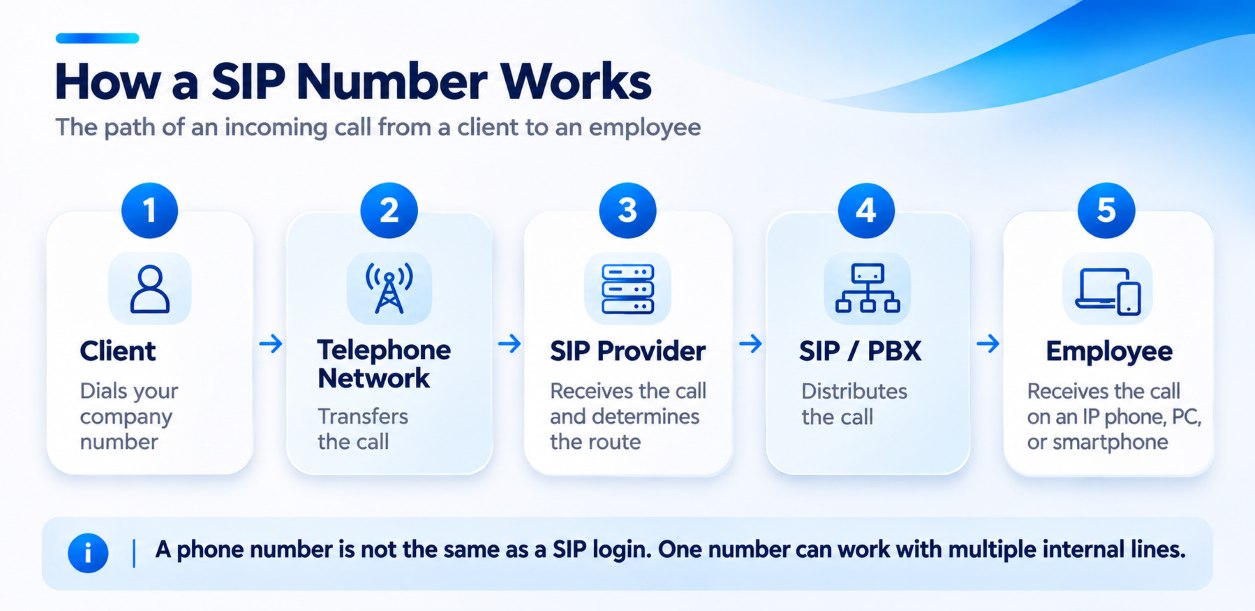
Let us take an incoming call as an example:
- The customer dials the company’s number. The call reaches the telephone system of the provider serving that number.
- The system determines where to send the call. The SIP server establishes a connection with the appropriate device or virtual PBX.
- An employee answers the call. The call arrives on their IP phone, computer or smartphone with a configured SIP application.
- The conversation begins. Voice is converted into digital packets and transmitted over the IP network.
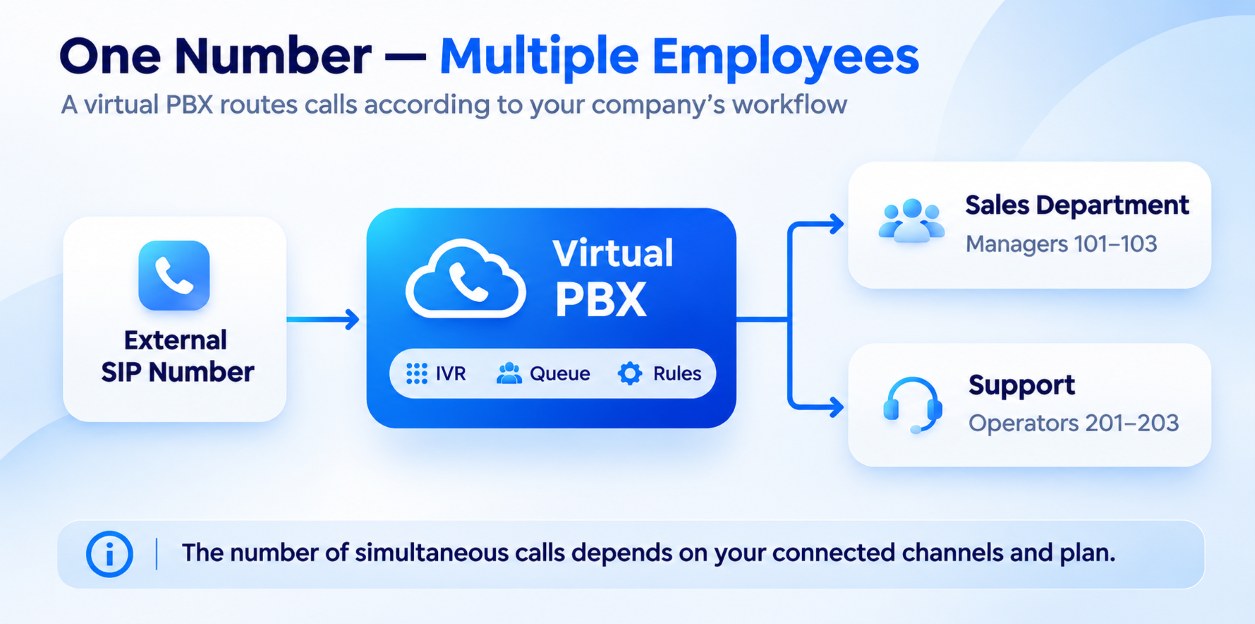
If the number is connected to a virtual PBX, it can automatically route calls to different employees based on their availability, working hours and configured distribution rules.
To make an outgoing call, an employee dials the customer’s number from their device, and the provider’s system establishes a connection with the intended recipient.
With a virtual PBX and a suitable number of channels, a company can use one business number for several employees, even if they are based in different cities. All that is required is to connect the appropriate devices to the telephone system and provide stable internet access.
What do you need to connect a SIP number?
You do not have to buy special equipment or lay telephone lines to connect a SIP number. To get started, you need a computer or smartphone with internet access, a calling application and the SIP settings supplied by your provider.
Here is what you will need.
1. A SIP telephony provider
First, choose a provider that will connect your telephone number and handle calls. With Stream Telecom, you can connect IP telephony for your business, choose a business number and, if needed, add call management features, call recording and CRM integration to your telephone system.
2. A stable internet connection
SIP telephony operates over an IP network, so call quality depends not only on internet speed but also on connection stability. A single call does not usually require high bandwidth, but you need to account for network load when handling many simultaneous conversations.
3. A device for making and receiving calls
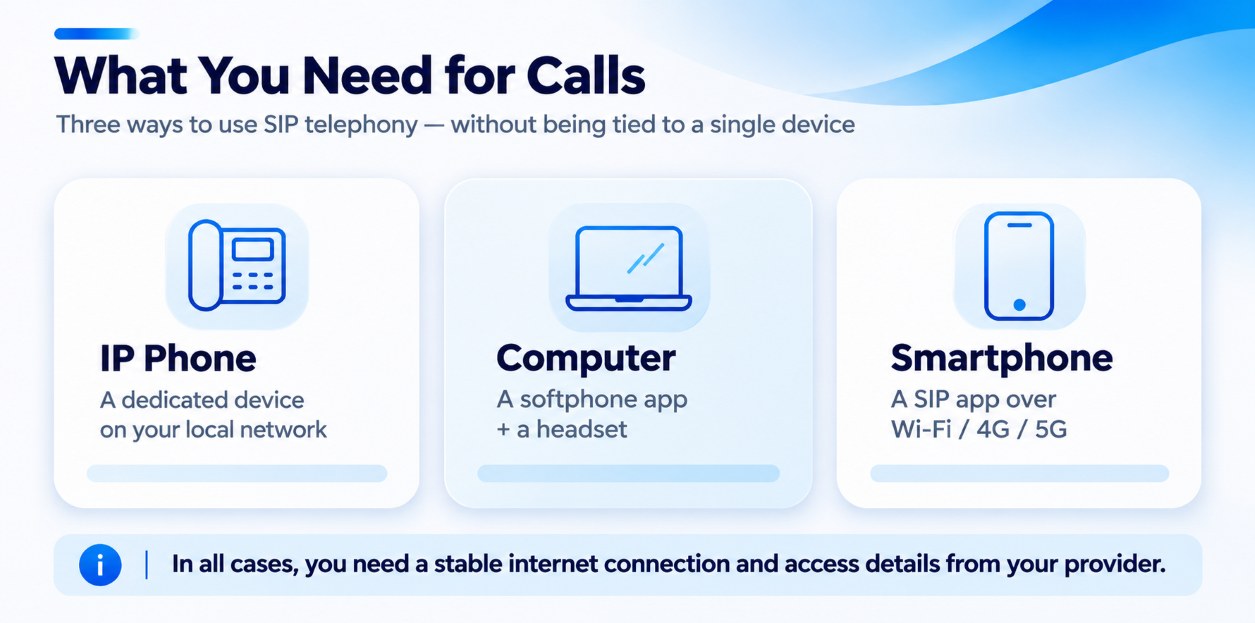
You can use one of the following options:
- An IP phone — a desk phone that connects to a computer network and works with SIP telephony.
- A computer or laptop — with a headset and an installed calling application.
- A smartphone — with a SIP application that lets you use business telephony over Wi-Fi or mobile internet.
For a small team, existing computers or smartphones are often enough. IP phones are a practical choice where employees regularly handle calls at fixed workstations.
4. A SIP calling application (softphone)
If your company does not use physical IP phones, you will need a softphone: an application that functions as a telephone on a computer or smartphone. This could be Zoiper, Linphone or another SIP client compatible with your telephone system’s settings.
5. SIP account credentials
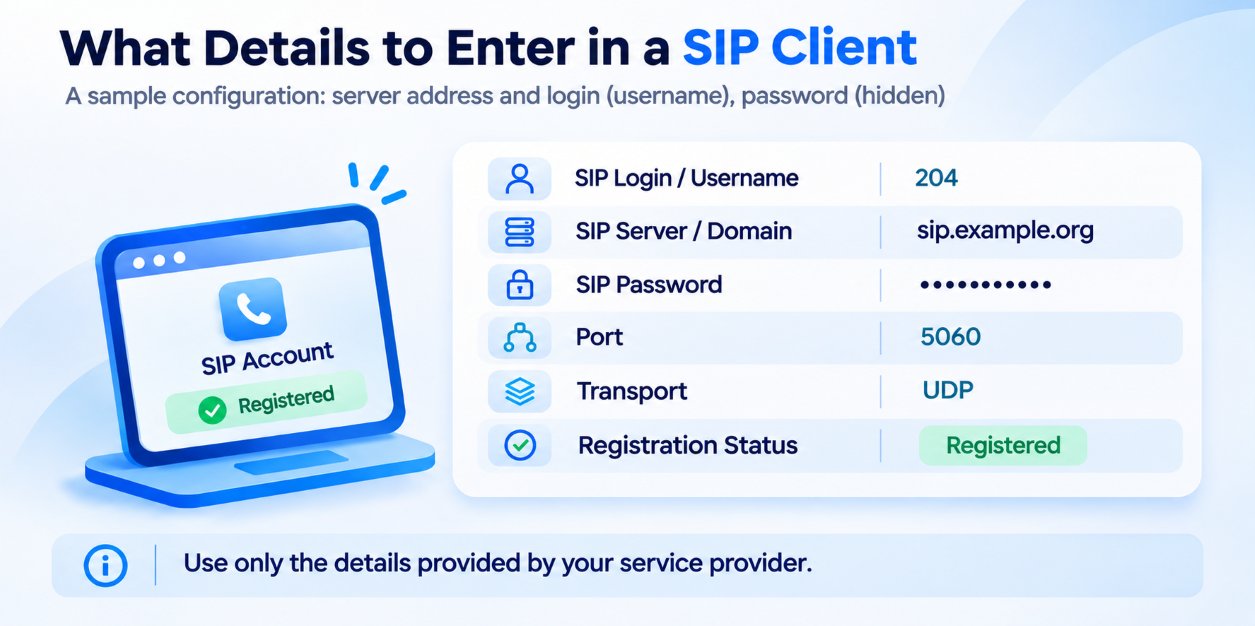
Once the service is connected, your provider supplies the settings needed to register a device with the telephone system. These usually include:
- SIP Login — the account identifier.
- SIP Password — the password used for authentication.
- SIP Server / Domain — the address of the server the device connects to.
- Port and Transport Protocol — additional connection parameters, if required for your specific configuration.
Enter these details in the IP phone or softphone settings. Once registered successfully, the device can make and receive calls according to the services you have connected.
If several employees will use the telephone system, consider connecting a virtual PBX from the outset. It brings employees together in a single telephone system and allows you to configure call distribution, call forwarding and other enquiry-handling scenarios.
How to connect a SIP number: 5 simple steps
In most standard scenarios, connecting a SIP number does not require complex configuration: after the service is activated, you simply add the SIP credentials you received to a compatible phone or application. With Stream Telecom, you can order a business number, connect it to the telephone system and set up calls on the devices that suit you.
Here are 5 steps to follow:
- Order a SIP number. Browse the available business phone numbers and submit a connection request. Our specialists will help you choose the number type, plan and telephony configuration based on the number of employees and the expected call volume.
- Receive confirmation of connection. Once the service is arranged and the number is activated, you will receive the information needed to start using telephony.
- Receive your SIP settings. To connect a device, you will use SIP Login, SIP Password and SIP Server / Domain. Keep the supplied account credentials: you will need them to authenticate with the telephone system.
- Configure your device. On an IP phone, open the Account / SIP Account section. If you plan to make calls from a computer or smartphone, install a compatible softphone, such as Zoiper or Linphone. Add a SIP account, enter the supplied details and save the settings. After a successful connection, the device will display Registered, confirming that registration is complete.
- Test the number. Make a test outgoing call and call your business number from another phone. Check that calls connect, voice is clearly audible in both directions and the configured number is displayed on outgoing calls.
After testing, your SIP number is ready to use. If you encounter difficulties with device registration or call quality, Stream Telecom’s technical support specialists will help check the settings and identify the cause.
How do you connect a SIP number to a virtual PBX?
If several employees answer calls to one business number, a basic SIP connection may not be enough. A virtual PBX is used to distribute calls automatically, manage workloads and monitor the team’s work.
A virtual PBX is a cloud-based telephone system that brings together business numbers and employees and manages calls according to predefined rules. Unlike a standalone SIP account, which connects a device to telephony, a PBX allows you to build a complete system for handling customer enquiries.
For example, when a customer calls the company, the system can automatically route them to the appropriate department, connect them with an available employee or place the call in a queue if all agents are busy.
What features does a virtual PBX provide?
By connecting SIP telephony to Stream Telecom’s virtual PBX, a company gains tools for managing business calls:
- Automatic call distribution. Incoming calls are distributed among employees according to the configured rules.
- Interactive voice response (IVR). Customers can select the department they need using their phone’s keypad.
- Call forwarding and call queues. If an employee is unavailable or all agents are busy, the system handles the call according to a predefined scenario.
- Call recording. Helps you check service quality, analyse enquiries and recover the details of agreements with customers.
- Statistics and analytics. Managers can track the number of incoming and outgoing calls, missed enquiries and employee workloads.
- CRM integration. With the appropriate integration enabled, call information and recordings can be saved automatically in customer records.
After the number is connected to the virtual PBX, employee extensions are configured and call routing rules are defined: who receives a call, what happens if an employee is busy and how the system handles enquiries outside working hours. The exact procedure depends on the PBX configuration and how the number is connected.
With Stream Telecom, you can use SIP telephony together with a virtual PBX to provide communications for office-based and remote employees. New employees can be connected to the telephone system without installing a separate physical PBX.
How much does it cost to connect a SIP number?
The cost of SIP telephony depends on the number type, the number of simultaneous calls and the additional features your company needs. A small business with one number will spend less than a contact centre with dozens of agents, call recording and CRM integration.
The cost usually consists of several components:
- Number connection. A one-off fee that may vary depending on the number type and the provider’s terms.
- Subscription fee. A recurring payment for the number and the services connected to it.
- Outgoing calls. The cost depends on the call destination, conversation length and selected plan. Bundles of minutes may offer better value for companies with high call volumes.
- Additional features. Call recording, CRM integration, analytics and other tools may be included in the plan or charged separately.
- Virtual PBX. If you need to bring several employees together in one telephone system, the cost will depend on the selected package and the number of connections.
You can review the current terms on the telephony rates and virtual PBX pricing pages. Our specialists will help you select a telephony configuration without unnecessary features or costs.
Common mistakes when setting up SIP telephony
Even when a SIP account is configured, calls may fail to connect, drop or work in only one direction. Errors in connection parameters or local network settings are often responsible.
Let us look at the most common problems and how to resolve them.
| Problem | Possible cause | What to do |
|---|---|---|
| The device does not register with the SIP server | Incorrect SIP login or password | Check the credentials, character case and absence of extra spaces. |
| Server connection error | Incorrect SIP server address or port | Compare the settings with the details supplied by your provider. |
| Audio breaks up or is delayed | Unstable internet, packet loss or network congestion | Check connection quality. Where possible, use a wired internet connection and configure voice traffic prioritisation (QoS). |
| The call connects, but one party cannot be heard | Problems with NAT, RTP routing or firewall settings | Check the network configuration and NAT settings in accordance with your provider’s recommendations. |
| The SIP account is registered, but calls do not connect | Network restrictions, incorrect call settings or routing | Check the SIP client settings, the availability of call destinations and the routing rules. |
Pay particular attention to router settings. Some devices have a SIP ALG feature that modifies SIP packet parameters and can cause connection problems in certain configurations. If faults occur, review its settings with your system administrator or technical support.
If you use Stream Telecom telephony and cannot identify the cause of a fault yourself, contact our technical support team. To help speed up diagnosis, provide the device model or softphone name, the SIP account’s registration status and a description of the stage at which the problem occurs.
How do you choose a SIP provider for your business?
When choosing a SIP provider, assess not only the cost of the number and calls, but also how well the telephone system will meet your company’s needs. For example, a small office may need only one business number, while a sales department needs call distribution, CRM integration and tools for monitoring employees’ work.
To choose a solution you will not have to replace as your business grows, consider the following criteria:
- Reliability and call quality. Find out how the provider ensures telephony availability, whether infrastructure redundancy is in place and what service terms apply.
- Technical support. Check whether specialists help with SIP account connections, equipment configuration and troubleshooting.
- Scalability. Check whether you can add numbers, connect employees and increase the number of simultaneous calls without rebuilding the entire system.
- CRM integration. Telephony connected to a CRM allows you to log calls automatically, preserve communication history and link enquiries with customers and deals.
- Virtual PBX features. If a team handles calls, important features include call routing, IVR, queues, call forwarding and call recording.
- Analytics. Statistics on answered and missed calls, conversation length and employee workloads help assess the work of a sales or support department.
- Transparent pricing. Compare not just the subscription fee, but also the cost of calls, additional numbers, features and integrations.
With Stream Telecom, you can build a telephone system that matches your company’s size: connect business numbers, use a virtual PBX, record conversations and integrate telephony with your CRM. This allows you to go beyond basic telephone communications and manage calls as part of your company’s workflows.
Before choosing a configuration, we recommend determining the number of employees, expected call volume and features you need now or may need in the near future. This helps you select telephony without unnecessary costs and with room for further expansion.
Connect SIP telephony with Stream Telecom
At Stream Telecom, we help businesses organise telephone communications around their needs, from connecting a single business number to building a telephone system for a sales department or contact centre.
You do not have to work out the technical parameters and equipment compatibility yourself. Our specialists will analyse your requirements, help you choose a number and plan, identify the right configuration and connect your telephony. If needed, we will configure a virtual PBX, call distribution among employees and CRM integration.
After connection, you will be able to expand your telephone system as your business grows and contact our support team whenever technical questions arise.
Need a SIP number for your business? Submit a request — we will select a solution for your company and help you get started with IP telephony.
Frequently asked questions about connecting a SIP number (FAQ)
How can I connect a SIP number myself?
To connect a SIP number yourself, order the service from a provider and obtain the SIP login, password and server address. Then install a SIP application on your computer or smartphone, or configure an IP phone. Enter the supplied details, wait for the device to register and test incoming and outgoing calls.
Where can I get a SIP number?
You can order a SIP number from an IP telephony operator. Stream Telecom offers business phone number connections, including landline, mobile, 0800 and international numbers. The number type and connection terms depend on your company’s needs.
Can I connect a SIP number without an IP phone?
Yes, you do not have to buy a physical IP phone to use a SIP number. A computer or smartphone with internet access and a compatible SIP application, such as Zoiper or Linphone, is sufficient. A headset with a microphone is recommended for calls on a computer.
Does SIP telephony work on a smartphone?
Yes, SIP telephony works on Android and iOS smartphones through dedicated applications. Once the SIP account is configured, you can make and receive business calls over Wi-Fi or mobile internet. To receive incoming calls reliably, consider the application’s background operation and notification settings.
Does SIP telephony require a continuous internet connection?
To make and receive SIP calls, the device must have access to the internet or the relevant IP network. If the connection is lost, the phone or softphone may lose its server registration and stop receiving calls. With a virtual PBX, you can configure alternative call-handling scenarios for when an employee is unavailable.
How does a SIP number differ from a regular number?
For a customer, a SIP number looks like a regular telephone number: they can call it from a landline or mobile phone. The main difference is how communications are organised: SIP telephony uses an IP network, so a separate telephone line is not required at each workstation. The number can be used on different compatible devices or connected to a virtual PBX.
How long does it take to connect a SIP number?
Connection time depends on the number type, the application process and the required telephony configuration. After the service is activated, setting up one IP phone or softphone usually takes little time if all account credentials are available. You can confirm the exact connection time with Stream Telecom when submitting your request.
Can I connect a SIP number to a virtual PBX?
Yes, a SIP number can be used with a virtual PBX to organise business communications. This allows you to configure automatic call distribution among employees, IVR, call forwarding and call recording. Several numbers and employees can be connected to one telephone system.
How much does SIP telephony cost for a business?
The cost depends on the number type, subscription fee, outgoing call rates and additional services. If the company needs a virtual PBX, the selected feature package and number of connections also affect the overall cost. You can view Stream Telecom’s current rates on the website or ask our specialists.
How can I check whether a SIP number is configured correctly?
First, check the SIP account status: after a successful connection, the device usually displays Registered, indicating that registration is complete. Then make an outgoing call and call your SIP number from another phone. If calls connect, voice is transmitted in both directions without interruptions and the number is displayed as configured, the telephony is working correctly.